---
type: "Blog Post"
title: "Multilingual SEO guide: hreflang and canonicals | Roicool"
description: "Multilingual SEO guide based on Google's docs: URL structure, hreflang, language codes, x-default, canonicals and Search Console checks."
url: "https://www.roicool.com/en/blog/multilingual-seo-hreflang-guide"
lang: "en"
dateModified: "2026-11-28"
author: "Zehra Adaş"
resource: "https://www.roicool.com/en/blog/multilingual-seo-hreflang-guide"
alternates:
tr: "https://www.roicool.com/blog/cok-dilli-seo-hreflang.md"
generated: { by: "process:roicool-cms", at: "2026-11-28T07:00:04.668Z" }
related:
- { title: "The international patient journey: what content each stage needs, in each language", resource: "https://www.roicool.com/en/blog/patient-journey-multilingual-content.md" }
- { title: "Medical Tourism SEO in Turkey: 2026 Google and Legal Rules", resource: "https://www.roicool.com/en/blog/medical-tourism-seo-turkey.md" }
- { title: "Website migration SEO checklist: moving to a new site without losing traffic", resource: "https://www.roicool.com/en/blog/website-migration-seo-checklist.md" }
sources:
- { id: "1", resource: "https://developers.google.com/search/docs/specialty/international/localized-versions", title: "Google Search Central, Tell Google about localized versions of your page" }
- { id: "2", resource: "https://developers.google.com/search/docs/specialty/international/managing-multi-regional-sites", title: "Google Search Central, Managing multi-regional and multilingual sites" }
- { id: "3", resource: "https://developers.google.com/search/docs/crawling-indexing/consolidate-duplicate-urls", title: "Google Search Central, How to specify a canonical URL with rel=\"canonical\" and other methods" }
- { id: "4", resource: "https://support.google.com/webmasters/answer/12474899", title: "Search Console Help, The International Targeting report is deprecated" }
- { id: "5", resource: "https://support.google.com/webmasters/answer/9012289", title: "Search Console Help, URL Inspection tool" }
- { id: "6", resource: "https://support.google.com/webmasters/answer/7440203", title: "Search Console Help, Page indexing report" }
- { id: "7", resource: "https://support.google.com/webmasters/answer/7576553", title: "Search Console Help, Performance report (Search results): Overview and basic setup" }
---
# Multilingual SEO guide: hreflang, URL structure and canonicals
In multilingual SEO, each language version gets its own URL and is linked to the others with hreflang in HTML, HTTP headers or a sitemap; every version lists itself and all others. Canonicals point to the same-language page, visitors aren't redirected by guessed language, and x-default can cover unmatched languages.
- Google recommends a separate URL per language version, not switching language on one URL with cookies or browser settings.
- The three hreflang methods (HTML, HTTP header, sitemap) are equivalent for Google; pick one and apply it consistently.
- If two pages don't point to each other, hreflang is ignored; every version lists itself and all the others.
- Language codes use ISO 639-1, regions ISO 3166-1 Alpha 2; a lone country code is invalid; GB, not UK.
- With hreflang, the canonical should point to the same-language page; don't canonicalize every language to one version.
- Search Console's International Targeting report is deprecated; use URL Inspection and the Performance report for checks.
Adding a second language raises three search questions: where each language lives, how Google knows the pages are versions of each other, and what happens to a visitor who lands on the wrong one. This guide answers them with what Google Search Central documents: URL structure, the three ways to implement hreflang, language and region codes, x-default, how hreflang interacts with canonicals, automatic redirects, and what to check in Search Console.
This is the technical side of multilingual SEO. Content decisions, such as which pages each language needs, are in our post on [the international patient journey and multilingual content](https://www.roicool.com/en/blog/patient-journey-multilingual-content). Its examples come from medical tourism, but the framework applies to other industries too.
## Multilingual and multi-regional sites are not the same thing
Google draws a line between the two. A multilingual site offers content in more than one language; Google's example is a Canadian business with English and French versions. Here, Google Search tries to find pages that match the searcher's language. A multi-regional site explicitly targets users in different countries, such as a manufacturer that ships to both Canada and the US. Here, Google tries to find the right locale page for the searcher. Some sites are both.
If you only target languages, your hreflang values will often be plain language codes (`de`, `en`). If you serve several countries in one language with different prices, currencies or shipping terms, region codes come into play, and so does canonical handling for similar same-language pages.
## Choosing a URL structure: ccTLD, subdomain or subdirectory
Google recommends a different URL for each language version rather than switching the language on the same URL with cookies or browser settings. Its "Managing multi-regional and multilingual sites" page compares the options this way:
| Structure | Example | Pros Google lists | Cons Google lists |
| --- | --- | --- | --- |
| Country-specific domain (ccTLD) | `example.de` | Clear geotargeting; server location irrelevant; easy separation of sites | Expensive, may have limited availability; more infrastructure; sometimes strict ccTLD requirements; can only target a single country |
| Subdomain on a gTLD | `de.example.com` | Easy to set up; allows different server locations; easy separation of sites | Users may not recognize geotargeting from the URL alone (is "de" the language or the country?) |
| Subdirectory on a gTLD | `example.com/de/` | Easy to set up; low maintenance (same host) | Users may not recognize geotargeting from the URL alone; single server location; harder to separate sites |
| URL parameter | `site.com?loc=de` | Not recommended | URL-based segmentation is difficult; users may not recognize geotargeting from the URL alone |
Apart from ruling out URL parameters, Google doesn't name one option as the right one; it presents the table as tradeoffs. The choice depends on how many markets you serve, whether each market has its own team, and your infrastructure.
Among the signals Google uses to work out who a page is for, a country-code domain is a strong one, while server location isn't definitive because many sites use CDNs or are hosted abroad. Google treats some country-code domains, such as .io, .co and .ai, as generic (a list it says may change), and it ignores locational meta tags such as `geo.position`.
## How Google detects the language of a page
Google determines a page's language from its visible content. It says it doesn't use code-level language information, such as the `lang` attribute, or the URL for this. It doesn't use hreflang for language detection either; it uses its own algorithms. Hreflang does a different job: it tells Google that the pages are localized variations of the same content.
Keep the content and navigation of each page in one language, and avoid side-by-side translations. Translating only the menus and footer while the main content stays in one language can create a poor experience if the same content shows up in search results several times with different template languages. Google says localized versions are only considered duplicates if the main content stays untranslated. For pages like forums, where user content stays in one language and only the template is translated, Google still recommends declaring the alternates.
## Three ways to implement hreflang
Google accepts language and region variants through HTML tags, HTTP headers or a sitemap. Its documentation says the three methods are equivalent from Google's point of view, so pick whichever suits your site. Using all three brings no benefit in Search and can make maintenance harder. Google may find alternates on its own, but says it's usually best to declare them.
### HTML link tags
Add one `` element to the `` of each version for every variant, including the page itself. The set is identical on every version. For a page in English and Turkish, both versions carry these two lines in their head:
- ``
- ``
The tags must sit inside a well-formed ``. If you aren't sure, Google suggests pasting the rendered page's code into an HTML validator. Don't combine hreflang with other attributes, such as `media`, in a single `` tag.
### HTTP headers
For non-HTML files such as PDFs, return a `Link:` header with the GET response. Wrap each URL in `<` and `>`, list every version including the one requested, and send the same header on every version. For example: `Link: ; rel="alternate"; hreflang="en", ; rel="alternate"; hreflang="tr"`
### XML sitemap
The sitemap rules: declare the `xmlns:xhtml="http://www.w3.org/1999/xhtml"` namespace; give each URL its own `` element with a ``; and in every ``, add `` children listing every version, including itself. A page with three versions gets three sitemap entries, each with the same three children.
The order of the children doesn't matter, though Google notes you may want to keep it consistent so mistakes are easier to spot. The children don't count toward the sitemap URL limit. A sitemap can only contain URLs below the directory it's hosted in, and the general sitemap guidelines still apply. Some CMSs generate these entries for you; we explain how it works for Webflow sites using Localize in our post on [Webflow SEO settings](https://www.roicool.com/en/blog/webflow-seo-settings).
### Rules that apply to every method
- Each language version lists itself and every other language version.
- URLs are fully qualified, including the protocol: `https://example.com/foo`, not `//example.com/foo` or `/foo`.
- Alternate URLs don't have to be on the same domain.
- Return links are required: if two pages don't both point to each other, the tags are ignored. Google explains that this stops another site from declaring itself an alternate version of your page.
- If full bidirectional links get hard to maintain, you can leave some languages off some pages; Google still processes the pairs that point to each other. But link newly added language pages bidirectionally to the original, dominant language.
## Language and region codes
An hreflang value has one or two parts separated by a hyphen. The first is a language code in ISO 639-1 format; the optional second is a region code in ISO 3166-1 Alpha 2 format. Codes outside those two standards aren't supported, apart from the ISO 15924 script codes below.
| Value | Meaning | Status |
| --- | --- | --- |
| `de` | German, any region | Valid |
| `en-GB` | English, users in the UK | Valid |
| `de-ES` | German, users in Spain | Valid |
| `be` | Belarusian, not Belgium | A country code can't stand alone; use `fr-BE` for French in Belgium |
| `en-UK` | UK is a reserved code | Google ignores that part; use `GB` for the United Kingdom |
| `es-419` | Latin American Spanish | Not supported |
| `zh-Hant`, `zh-Hans-US` | Traditional Chinese; Simplified Chinese for users in the US | Valid with an ISO 15924 script code |
Google explicitly warns that the first code stands for the language and that it doesn't derive the language from a country code. Values are case-insensitive: Google accepts lowercase and uppercase codes, and writing the region in uppercase, as in `en-GB`, follows ISO convention. Codes reserved for something else, such as `EU` or `UN`, have no effect in Google Search.
If you have separate pages for several regions in one language (say `en-IE`, `en-CA` and `en-AU`), Google suggests also providing a generic page (`en`) for speakers of that language elsewhere. It can be one of the regional pages.
## x-default: the fallback for unmatched languages
`x-default` is a reserved value used when a user's browser settings match none of your language or region versions. Google suggests considering such a fallback page especially for language or country selectors and home pages that redirect visitors automatically. It says you can use it on any page, but it was designed for language selector pages and works best there. Don't attach a language code to x-default; the users it serves are, by definition, those whose language you don't match.
In practice, x-default is one more line in the hreflang set: ``. Without a selector page, which version becomes x-default is your call, for example the one most unmatched visitors are likely to understand. That's an implementation choice, not a Google rule.
## How canonical tags and hreflang work together
A canonical tells Google which of several identical or very similar pages to treat as the main one. Hreflang connects language and region versions of the same content. Google's canonical documentation sets out where the two meet:
- If you use hreflang, specify a canonical page in the same language, or the best possible substitute language if no same-language canonical exists. Google also recommends a rel="canonical" link on the canonical page itself (a self-referencing canonical). Read together, each language version carries its own canonical; pointing the English page's canonical to the Turkish one would break this rule.
- rel="canonical" annotations that carry `hreflang`, `lang`, `media` or `type` attributes aren't used for canonicalization. Declare alternate versions with `rel="alternate"` and `hreflang` instead.
- If similar or duplicate same-language content lives on different URLs (Google's example is `example.de/` and `example.com/de/` showing similar German content), pick a preferred version and use rel="canonical" plus hreflang so the right URL is served.
- For canonicalization, Google prefers URLs that are part of hreflang clusters. If `/de-de/` and `/de-ch/` point to each other but not to `/de-at/`, the first two are preferred as canonicals.
- Google lists putting the HTTP version of pages in your sitemap or hreflang annotations among the practices that can lead it to pick the HTTP page as canonical by mistake. Use HTTPS URLs in hreflang.
For a general explanation of canonicals, see our glossary entry on [canonical URLs](https://www.roicool.com/en/glossary/canonical-url).
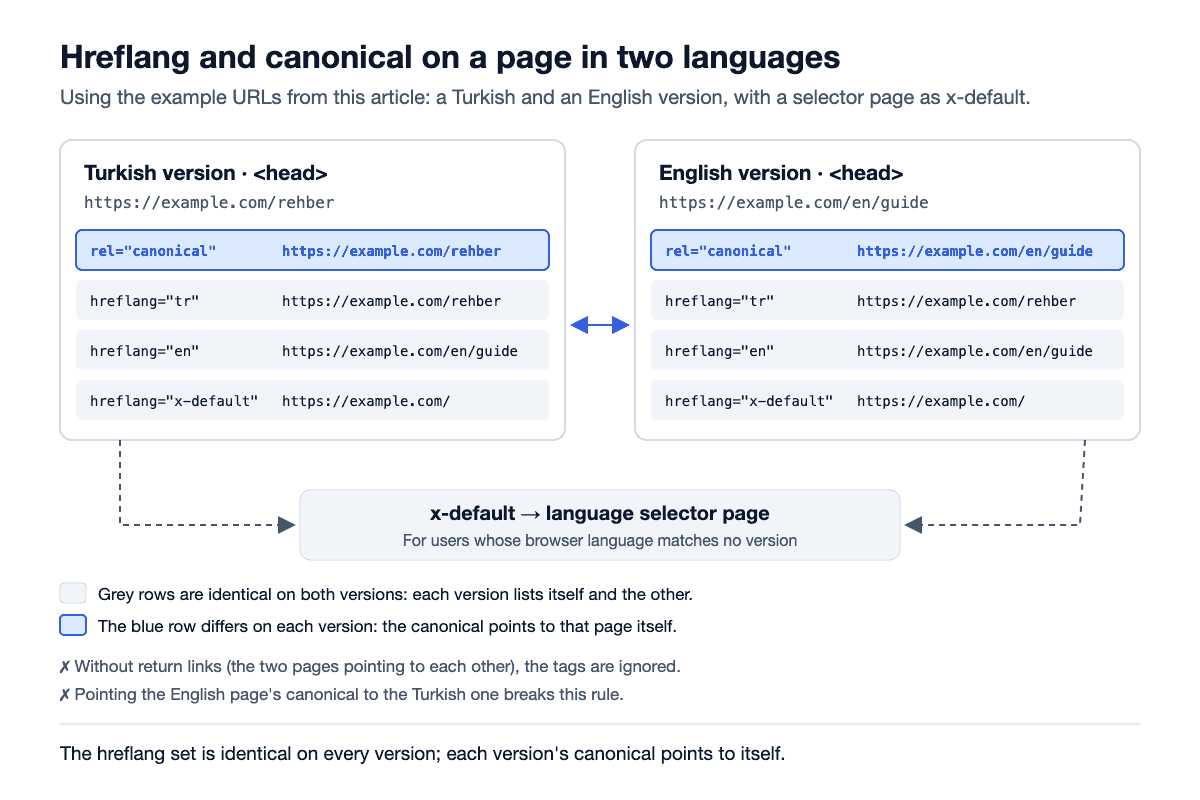
*The head of the Turkish and English versions: the hreflang lines are identical on both, each canonical points to the page itself, and unmatched languages go to x-default.*
## Automatic redirects and IP-based content
Sending visitors to another language version based on their IP or browser language looks helpful, but Google advises against it. Its documentation says to avoid automatically redirecting users from one language version to another, especially based on what you think their language is, because such redirects can stop users and search engines from seeing all versions of your site.
The technical reason is the crawler. According to Google, Googlebot usually crawls from the US and sends requests without an `Accept-Language` header. Most, but not all, of its crawls originate in the US, and Google doesn't vary crawl location to discover variations of a site. If your site swaps content or reroutes users based on language settings, Google might not find and crawl every variation. Google also calls IP location analysis difficult and generally unreliable, and says not to use it to adapt content.
What Google recommends instead: a separate URL for each language, hreflang annotations, and links on every page to the other language versions. If you want to suggest a language, a dismissible prompt instead of a redirect fits that principle. That's our suggestion, not a rule from Google's documentation.
## What to check in Search Console
Search Console's International Targeting report has been deprecated (Search Console Help, checked November 2026). Google still supports and uses hreflang, but Search Console's country targeting setting is no longer supported, so target a country with locale-specific URLs and hreflang.
The checks that work today:
- **URL Inspection tool:** Inspect a language version and compare "User-declared canonical" with "Google-selected canonical." The help page notes there's no guarantee Google will choose the canonical you declare. The canonical can only be seen in indexed data; the live test can't predict whether the tested version will be treated as canonical.
- **Page indexing report:** The status "Duplicate, Google chose different canonical than user" can surface same-language regional pages where your canonical isn't working as intended. One caveat: according to Google, Search Console doesn't detect alternate language pages, so don't read "Alternate page with proper canonical tag" as a list of your language versions.
- **Performance report:** Add a country filter and switch to the Pages tab to see which language version appears in searches from that country. If a country's impressions pile up on a version you didn't expect, recheck hreflang and the page's visible language.
For debugging, Google's hreflang page points to third-party tools rather than a Google tool (a tag generator and a single-page validator) and notes that Google doesn't maintain or check them. Auditing a whole cluster takes a site crawl.
## Pre-launch checklist
1. Does each language version have its own crawlable URL, with no language switching by cookie or browser setting?
2. Is the content and navigation on each page in a single language?
3. Is hreflang delivered through one method (HTML, HTTP header or sitemap)?
4. Does each version list itself and every other version as fully qualified URLs, with complete return links?
5. Are codes in ISO 639-1 and ISO 3166-1 Alpha 2 format, with GB instead of UK and no country code on its own?
6. If you use x-default, does it point to a selector or a fallback page you chose deliberately?
7. Does each version's canonical point to the page in its own language, and are the hreflang URLs HTTPS?
8. Is automatic redirection by language or IP turned off, with a visible language switcher on every page?
9. After launch, does the URL Inspection tool show the Google-selected canonical you expect?
Moving an existing site to a new URL structure (say, from subdomains to subdirectories) is a separate job; we cover redirects and post-launch checks in our [website migration SEO checklist](https://www.roicool.com/en/blog/website-migration-seo-checklist). Hreflang and canonical audits are also part of [technical SEO](https://www.roicool.com/en/services/technical-seo) work.
Roicool sets up URL structure, hreflang and sitemaps as part of its [international SEO](https://www.roicool.com/en/services/international-seo) service, alongside separate keyword research and localized content for each language.
## Sources
1. [Google Search Central, Tell Google about localized versions of your page](https://developers.google.com/search/docs/specialty/international/localized-versions), 2026
2. [Google Search Central, Managing multi-regional and multilingual sites](https://developers.google.com/search/docs/specialty/international/managing-multi-regional-sites), 2026
3. [Google Search Central, How to specify a canonical URL with rel="canonical" and other methods](https://developers.google.com/search/docs/crawling-indexing/consolidate-duplicate-urls), 2026
4. [Search Console Help, The International Targeting report is deprecated](https://support.google.com/webmasters/answer/12474899), 2026
5. [Search Console Help, URL Inspection tool](https://support.google.com/webmasters/answer/9012289), 2026
6. [Search Console Help, Page indexing report](https://support.google.com/webmasters/answer/7440203), 2026
7. [Search Console Help, Performance report (Search results): Overview and basic setup](https://support.google.com/webmasters/answer/7576553), 2026
## FAQ
### Does hreflang improve rankings?
Google's hreflang documentation doesn't present the tag as a ranking boost. It describes it as a way to help Google Search send users to the version that best fits their language or region. Country targeting cuts both ways: Google says targeting a site to one country can help it rank there, at the expense of other locales and languages. The effect to expect from hreflang is the right language version showing up for searches in the right country.
### Is x-default required?
No. Google offers x-default as a recommendation: a fallback for users whose language settings match none of your versions. It helps most on language or country selector pages and on home pages that redirect visitors. A two-language site without a selector page can declare hreflang without x-default; if you add it, you decide which page it points to.
### How do I test for hreflang errors?
On a single page, paste the rendered HTML into a validator to confirm the tags really sit in the head. Across the site, crawl it and list whether each referenced version returns the link and whether every target URL resolves. Google's documentation points to third-party tools for debugging hreflang but says it doesn't maintain or check them. After launch, keep an eye on the Google-selected canonical in Search Console's URL Inspection tool.
### Can language versions live on different domains?
Yes. Google doesn't require alternate URLs to share a domain, and its own sitemap example puts .com and .de URLs in one hreflang cluster. The harder part is operational: when domains sit with different teams or systems, a URL change on one side may never reach the hreflang lines on the other. Managing the pairs from a single mapping table cuts down on broken return links.
### Do same-language country pages (en-US, en-GB) count as duplicate content?
Google lists same-language pages with small regional differences, such as English content for the US, the UK and Ireland, among the cases where declaring alternates with hreflang is recommended. Read with Google's canonical rules, each regional page keeps its own canonical and sits in the hreflang cluster; in Google's example, the UK page shows prices in pounds and the US page in dollars. Similar or duplicate same-language content on different URLs is a different case (Google's example is example.de/ and example.com/de/): then choose your preferred URL; for that case Google recommends using rel="canonical" together with hreflang.
Breadcrumb: [Home](https://www.roicool.com/en) › [Blog](https://www.roicool.com/en/blog) › [SEO](https://www.roicool.com/en/blog/category/seo) › Multilingual SEO guide: hreflang, URL structure and canonicals
Related pages:
- [The international patient journey: what content each stage needs, in each language](https://www.roicool.com/en/blog/patient-journey-multilingual-content)
- [Medical Tourism SEO in Turkey: 2026 Google and Legal Rules](https://www.roicool.com/en/blog/medical-tourism-seo-turkey)
- [Website migration SEO checklist: moving to a new site without losing traffic](https://www.roicool.com/en/blog/website-migration-seo-checklist)
Source: https://www.roicool.com/en/blog/multilingual-seo-hreflang-guide · Last updated: 2026-11-28