What YouTube Advertising Costs: The Pricing Models Behind the Number
Google publishes no average YouTube advertising cost, and no independent data set fills the gap. What you pay is produced by two choices you make in the panel: the ad format you run, and the bid model attached to it. Cost-per-view formats bill when a view is counted9. Bumper and non-skippable in-stream ads bill per thousand impressions1. Masthead is bought at a price reserved in advance1.
YouTube advertising, in Google's own terms, means building a Video campaign that shows ads in videos on YouTube and on websites and apps running on Google video partners2. The ad video itself must be hosted on YouTube1. The delivery surface is wider than the name suggests: video ads can also appear on the Display Network and on Google TV3.
The campaign is built inside the Google Ads platform, not in YouTube Studio, and it draws on the same billing account as the rest of your advertising. That matters for cost, because the surcharges and taxes described later in this guide land on the account invoice rather than on a per-campaign report.
Four variables decide the number on that invoice. First, the format and the exact event that triggers a charge. Second, the campaign subtype, which decides where the campaign runs and which ad formats it can use3. Third, the buying path: auction or reservation8. Fourth, the jurisdiction where the ad is served, because a surcharge is added on top of your advertising costs6.
Auction or reservation: the two ways to buy
Google documents two ways to buy. With auction you buy cost-effective ads by bidding in the Google Ads auction; with reservation you buy a targeted number of impressions at a fixed CPM8. The auction prices your ad against live demand for the same audience, so the number moves from day to day. Reservation trades that movement for a price agreed before the campaign starts, and it is the only route to some inventory.
Why no honest guide can quote an average CPV
Most guides ranking for this query quote a cost-per-view or CPM range without citing a source. That is our own reading of the ten pages ranking in August 202617, not an assumption. Google does not publish average prices for video ads, and the ranges in circulation trace back to other guides rather than to a measured data set. We are not adding another one to the pile.
What you can get is a forecast built on your own plan, audience and country. Reach Planner exists for that, where your account has access to it5: the tool plans the performance and spend of new ad campaigns across YouTube and Google video partners5, and it states plainly that all values quoted are estimates and don't guarantee future performance5. A forecast with a stated limit is worth more than a range with no source.
The Six YouTube Ad Formats and What Each One Charges For
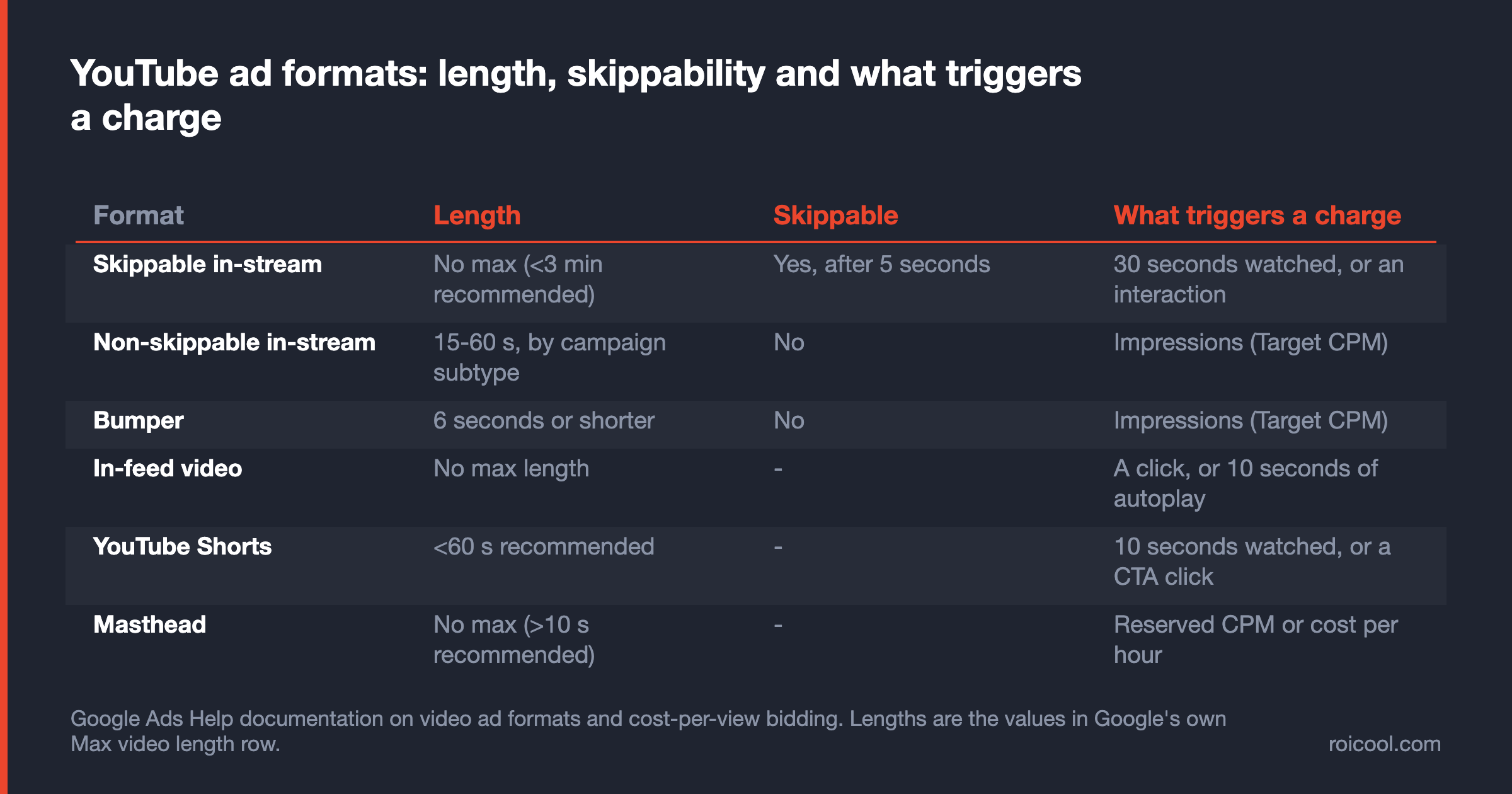
Google's About video ad formats page lists six video ad formats: skippable in-stream ads, non-skippable in-stream ads, in-feed video ads, bumper ads, Masthead ads and YouTube Shorts ads1. They differ in length and in whether the viewer can skip. The part that decides your cost is narrower than either: the event that has to happen before Google charges you.
Format availability is not a free choice either. The campaign subtype specifies how you want to reach people, where the campaign runs, and which ad formats can be used in the campaign3 — so the list you see in the panel is a subset of the six, decided by the objective you picked one screen earlier.
Skippable in-stream ads
These play before, during or after another video. After 5 seconds, the viewer has an option to skip the ad1. With CPV bidding you pay when a viewer watches 30 seconds of your video, or the entire duration if it is shorter, or interacts with your video, whichever comes first1. Everyone who skips before that point costs you nothing, which is where this format's reputation for cheap views comes from.
Non-skippable in-stream ads
The viewer cannot skip, and the billing model changes with it: non-skippable in-stream ads use Target CPM bidding, so you pay based on impressions1. Every delivered impression is billable, whether or not anyone watched to the end. Length is not a fixed property of the format either — Google's own format table publishes a range that moves with the campaign subtype1, and a section below shows which subtype produces which limit.
Bumper ads
Bumper ads are 6 seconds or shorter, play before, during or after another video, and viewers don't have the option to skip the ad1. Like non-skippable in-stream ads, they use Target CPM bidding, so you pay based on impressions1. Six seconds is a hard creative constraint: one message, one brand cue, no build-up.
In-feed video ads
In-feed video ads consist of a thumbnail image from your video with some text1. Google's Video campaigns page says they appear only on YouTube and reach people in places where they're discovering content2. The formats page attaches a condition to that: when opted into Google Video Partners (GVP) and opted into "In-feed ads", video ad formats will appear in-stream, in-feed, in-article or in-app across video partners on the Google Display Network1.
The billing event is narrow. You'll only be charged when someone clicks to watch the ad, or, when buying in-feed ads with a Video view campaign, when they watch it autoplay for at least 10 seconds1.
YouTube Shorts ads
Shorts ads serve on desktop, tablets, mobile web and apps, and connected devices like streaming devices, gaming consoles and TVs1. They are only available for multi-format ad campaigns, mixed with in-stream and in-feed video ads4, so Shorts is not a campaign you open on its own. In a cost-per-view setup a Shorts view is counted after 10 seconds, or on a call-to-action click9.
Masthead ads
Masthead ads are only available on a reservation basis through a Google sales representative1. There is no self-serve path and no button for it in the campaign creation flow. You can buy Masthead on a cost-per-thousand-impression (CPM) or cost-per-hour (CPH) basis1, and the hourly option exists because the placement is sold as a block of time on the YouTube home feed.
A seventh format sits outside that page and inside the panel. On the reservation path, Google Ads offers pause ads: shown on connected TV screens after a user has paused the video player for 10 seconds and hasn't interacted with the screen for 5 seconds8. The Premier reach option carries them alongside bumper, skippable in-stream, non-skippable in-stream and Shorts ads8. Pause ads are a sales-team buy, so they never appear in a self-serve format list.
Read those six as three billing families: view-triggered (skippable in-stream, in-feed, Shorts), impression-triggered (non-skippable in-stream, bumper) and reserved (Masthead). Choosing a format is choosing which of the three families spends your budget, and that choice constrains every cost figure you will report afterwards.
When You Are Actually Charged: TrueView Views, Impressions and Thresholds
You are charged when a view is counted, and "view" is not one definition. With CPV bidding, you'll pay for TrueView views and interactions, such as clicks on call-to-action overlays, cards, and companion banners9. Two different things can therefore produce a charge: enough watch time, or a deliberate action by the viewer.
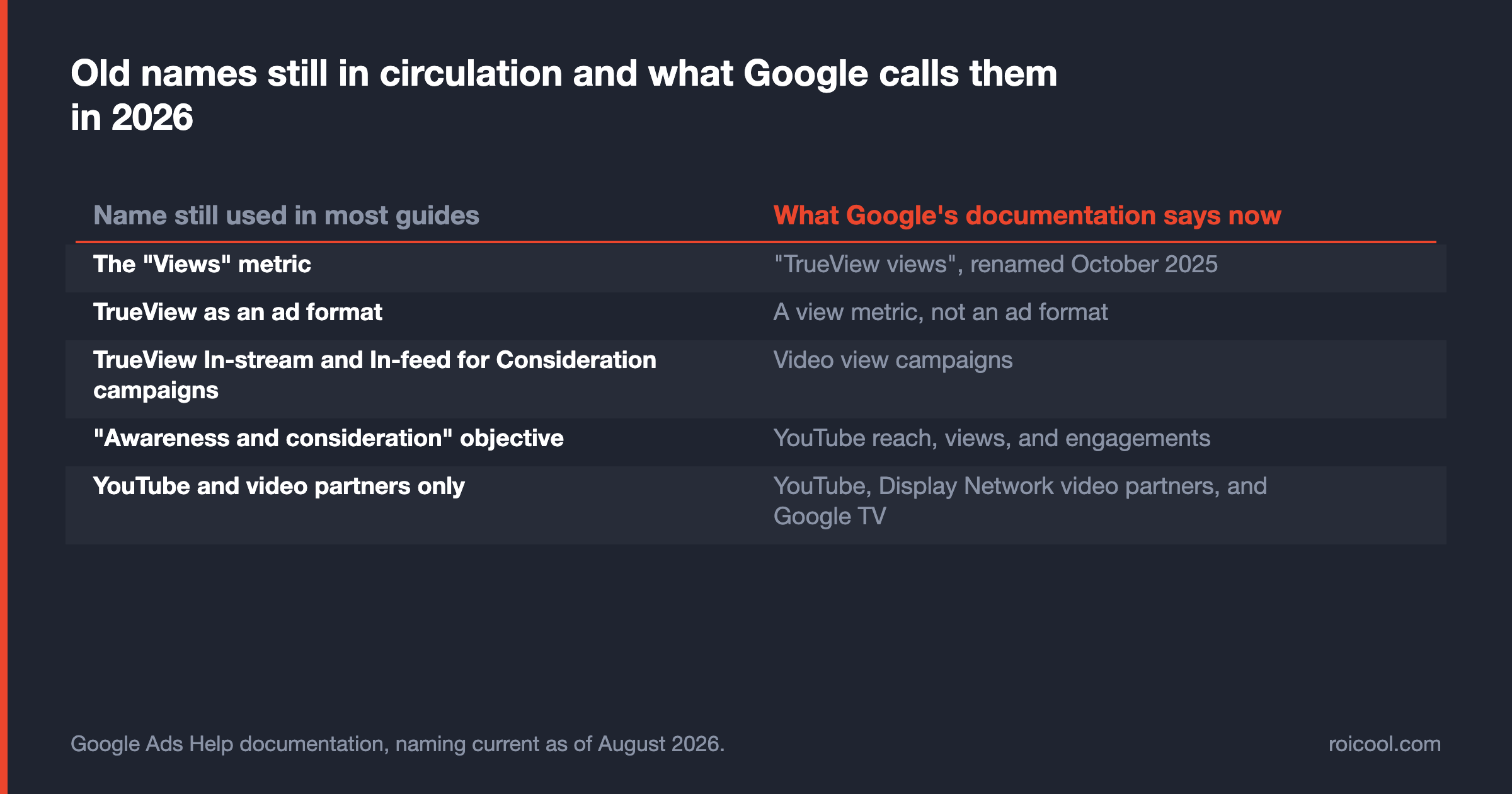
One naming point first, because it changes how you read everything else. As of October 2025, the "Views" metric is now called "TrueView views" in Google Ads1. TrueView is a view metric, not an ad format — a guide that offers you a choice between "TrueView ads" and "bumper ads" is comparing a measurement with a product.
In-stream: the 30-second threshold
For in-stream ads, a view is counted when someone watches 30 seconds of your video ad, or until the end of the ad if it's shorter than 30 seconds, or interacts with the ad, whichever comes first9. Below that threshold the ad still serves and still records a delivery, but no view is counted and, under CPV bidding, no charge lands.
That is the gap between an impression and a view, and it is where budget forecasts usually break. A plan built on impressions and a plan built on views describe the same delivery with two different price tags, and neither is wrong — they are simply not interchangeable in a spreadsheet.
In-feed and Shorts: a click, ten seconds, or a CTA
In-feed video ads charge on the click that starts the watch, or on 10 seconds of autoplay when they are bought inside a Video view campaign1. YouTube Shorts ads count a view when someone watches 10 seconds of your video ad, or until the end if it's shorter, or clicks the call to action9. Same currency name, three different thresholds.
If you are moving budget across from Meta Ads, check the billing trigger before you compare panels. The event that produces a charge is defined differently on each platform, so a cost-per-view column in one account and a cost-per-view column in the other are not the same unit of measurement.
The formats that cannot produce a TrueView view
Some ad formats like bumper ads or non-skippable in-stream ads aren't eligible for TrueView views9. The consequence deserves stating without softening: in those two formats your budget is consumed by impressions1, and a cost-per-view target has nothing to attach itself to. Choose them for coverage and message completion, and report them on impressions.
What Changed in 2025-2026: The Names Most Guides Still Get Wrong
Two names changed in October 2025 and most guides still use the old ones. The "Views" metric is now called "TrueView views" in Google Ads1, and the "Awareness and consideration" objective has been renamed to "YouTube reach, views, and engagements"1.
We downloaded the pages ranking for this query in August 2026 and read them. Not one of the ten uses the current names, and none mentions Video view campaigns, Google TV as a placement, or the audio reach subtype17. That is not a trivia point: a guide describing a panel that no longer exists is quoting prices for products you cannot select today.
Views became TrueView views
The metric was renamed; the mechanic was not. What Google now calls a TrueView view is still the threshold event described above — 30 seconds watched, the end of a shorter ad, or an interaction9. The rename matters because reporting columns and help-page language moved with it while third-party guides kept the old label, and readers assume an old label means a different, older product.
TrueView campaigns became Video view campaigns
On the campaign side, Google says it is evolving TrueView In-stream and In-feed for Consideration campaigns to Video view campaigns (VVC) powered by Google AI4. Inside a VVC, Google will automatically find as many TrueView views as it can using in-feed video ads, skippable in-stream video ads, and Shorts ads4. The benefit attached to that mix is stated as a ceiling: multi-format video ads can help you get up to 40% more views for your budget4.
Where video ads run now: Google TV and audio reach
The placement list also grew. Video ads can appear on YouTube, on websites and apps on the Display Network, also known as Google video partners, and on Google TV3. There is also a subtype cost guides never mention: audio reach, which reaches people while they're listening to content on YouTube3. Both change the answer to "where does my money actually go".
Practical use: before you accept any cost benchmark, check its date and its vocabulary. A range priced against TrueView In-stream campaigns cannot be mapped onto a Video view campaign that mixes three formats4 across three placement surfaces3 and reports on a renamed metric1.
How Long Can a Non-Skippable Ad Be? Google Publishes a Range, Not One Number
Google answers this in a table on the same page most guides take the format from. The maximum video length for non-skippable in-stream ads is 15-60 seconds (depending on the campaign subtype)1. The two numbers in circulation are the ends of that range: the About video ad formats page describes the format as 60 seconds or shorter1, and the About Video campaigns page describes it as 15 seconds or less2.
The campaign creation flow shows where each end comes from. Choose the Non-skippable reach subtype and Google says you reach people using bumper and 15-second non-skippable in-stream ads8. Choose the reservation path and the same format is documented as up to 30 seconds long8. A single format name, three published limits, each attached to a different subtype3.
Only two rows in that table carry a hard number: non-skippable, and bumper ads at 6 seconds or shorter1. The other four publish a recommendation instead of a limit — no max length for skippable in-stream ads, with under 3 minutes recommended; no max length for in-feed ads; under 60 seconds recommended for Shorts; and no max length for the Masthead, with more than 10 seconds recommended1.
The practical instruction is simple. Do not produce a non-skippable creative against a number you read in a guide, including this one. Open the campaign type you will actually run, check the length the panel accepts for that subtype, and cut to that. If one file has to serve two subtypes, produce the shorter cut and keep the longer master for reserved buys.
It is a media-planning constraint as much as a creative one. A 15-second master cannot be stretched to fill a reserved slot documented at up to 30 seconds8, and a 60-second cut has no home in a subtype documented at 15 seconds8. Decide the subtype first, then brief the edit; the reverse order costs a reshoot. When a guide states one non-skippable length as settled fact, check which subtype it was describing.
What Actually Moves Your YouTube Cost Up or Down
Cost moves on four documented levers and one undocumented one. The documented four are format and bid model, campaign subtype, delivery surface and creative mix. The undocumented one is auction pressure, and this guide will not put a number on it.
Format and bid model
This is the largest single lever because it changes the unit you are buying. Target CPM formats bill per impression1; CPV formats bill on TrueView views and interactions9. Moving budget from one to the other does not make advertising cheaper — it changes what you are counting, and a comparison of cost per result across the two is a comparison of two different results.
Campaign subtype and objective
The subtype is the earliest decision in the flow and the one with the widest blast radius: it fixes where the campaign runs and which ad formats it can use3. Pick a subtype whose available formats do not match your goal, and the rest of the setup becomes a workaround.
Where your ads run: partners, Google TV, connected devices
Delivery surface is a cost variable that most checklists treat as a setting. Video ads can appear on YouTube, on Display Network video partner sites and apps, and on Google TV3, while Shorts ads serve on desktop, tablets, mobile and connected devices such as streaming devices, gaming consoles and TVs1. A living-room impression and a mobile in-feed impression reach the same person in different states of attention.
Creative mix
Google frames the multi-format mix as a budget lever and attaches a ceiling to the claim rather than a result4. A Video view campaign pursues TrueView views across in-feed, skippable in-stream and Shorts ads at once4. "Up to" is the vendor's own wording and we keep it — a reported ceiling is not a number to plan against.
Three things you will find in every other cost guide are missing here on purpose: auction competition, audience demand and seasonality. All three move price. None of them is published with a number by Google, and no independent data set measures them across YouTube advertisers with a stated method. So there is no benchmark table in this guide, because a table with invented rows is worse than an open gap.
One more variable does not belong to the auction at all. Regulatory operating costs or DST fees may be charged in addition to your advertising costs, every time an ad is served in specific jurisdictions6. It is not a bidding effect but an invoice line, and it is large enough to deserve its own section.
Setting a Budget Without Guessing: Reach Planner and the Spend Ceiling
Google does not publish a minimum budget for Video campaigns. That is a documented absence rather than an oversight to fill with a round number: what the documentation does publish is a spending ceiling and a planning tool.
Is there a minimum? What Google actually publishes
The ceiling is explicit: you will never pay more than your daily spending limit, two times your average daily budget for most campaigns, on any particular day, or your monthly spending limit, 30.4 times your average daily budget for most campaigns, in any particular month10. Google states that limit for most campaigns and carves out no exception for Video campaigns, so a daily figure is in practice a monthly commitment.
Account-level mechanics — opening the account, platform-wide pricing and choosing between campaign types — sit outside this page; our Google Ads cost and setup guide covers them. What belongs here is the video-specific question: how large a budget has to be before a Video campaign can produce a readable result.
A meaningful floor is not a platform constant. It follows from the reach you need, the format you picked, the country you are serving and the frequency you can tolerate. The honest way to find it is to model the plan before committing money to it, and Google ships a tool for exactly that job.
Getting a forecast before you spend
Reach Planner plans the performance and spend of your new ad campaigns across YouTube and Google video partners5. It forecasts reach, frequency, views, and conversions estimates for your media plan, but doesn't guarantee performance or outcomes5, and it repeats that limit for every number it prints: all values quoted are estimates and don't guarantee future performance5.
One condition belongs with that recommendation, and no cost guide mentions it. In Google's own words, Reach Planner "isn't available in all regions as we gradually expand access to qualified Google Ads accounts", and the page points you to your Google Ads representative to find out whether you have access5. Check that before you build a plan around the tool.
If the tool is closed to your account, the fallback is measurement rather than a borrowed benchmark. Run a single subtype and a single format on a small daily budget, inside the published ceiling of two times that budget per day and 30.4 times it per month10, and read your own cost per view off your own account. That number is the only one that describes your audience.
Carry the limit with the forecast when you take it into a budget meeting. A planner output presented as a commitment is the fastest way to lose the following quarter's budget, and the tool itself refuses to make that promise5. Use it to size the plan, then measure the real numbers against it.
Reservation changes the budgeting logic entirely. Instead of bidding, you commit to a fixed CPM for a set number of impressions8, and for Masthead the price can be set per hour instead1. Committed inventory at a known price is a different planning exercise from an auction: volume risk disappears, and flexibility goes with it.
The Surcharge Nobody Mentions: Jurisdiction Fees on Top of Your Ad Spend
The most expensive thing missing from published YouTube cost guides is not a rate. It is a line on the invoice: regulatory operating costs or DST fees may be charged in addition to your advertising costs, and this applies every time an ad is served in specific jurisdictions, regardless of where your actual business is located6.
It follows where the ad is served, not where you are
Read the second half of that sentence again, because it is the mechanic. The surcharge follows the ad, not the advertiser. A London company advertising into Türkiye pays the Turkish rate; a Turkish company advertising into Austria pays the Austrian one. Your registered address never enters the calculation.
That has a practical consequence for anyone running one campaign across several countries. The same creative, the same bid and the same audience can produce different invoice totals depending on where the impressions landed. Surcharges are levied based on the number of ad impressions or clicks that are served in a specific jurisdiction6, so the split follows delivery, not planning.
The rates Google documents
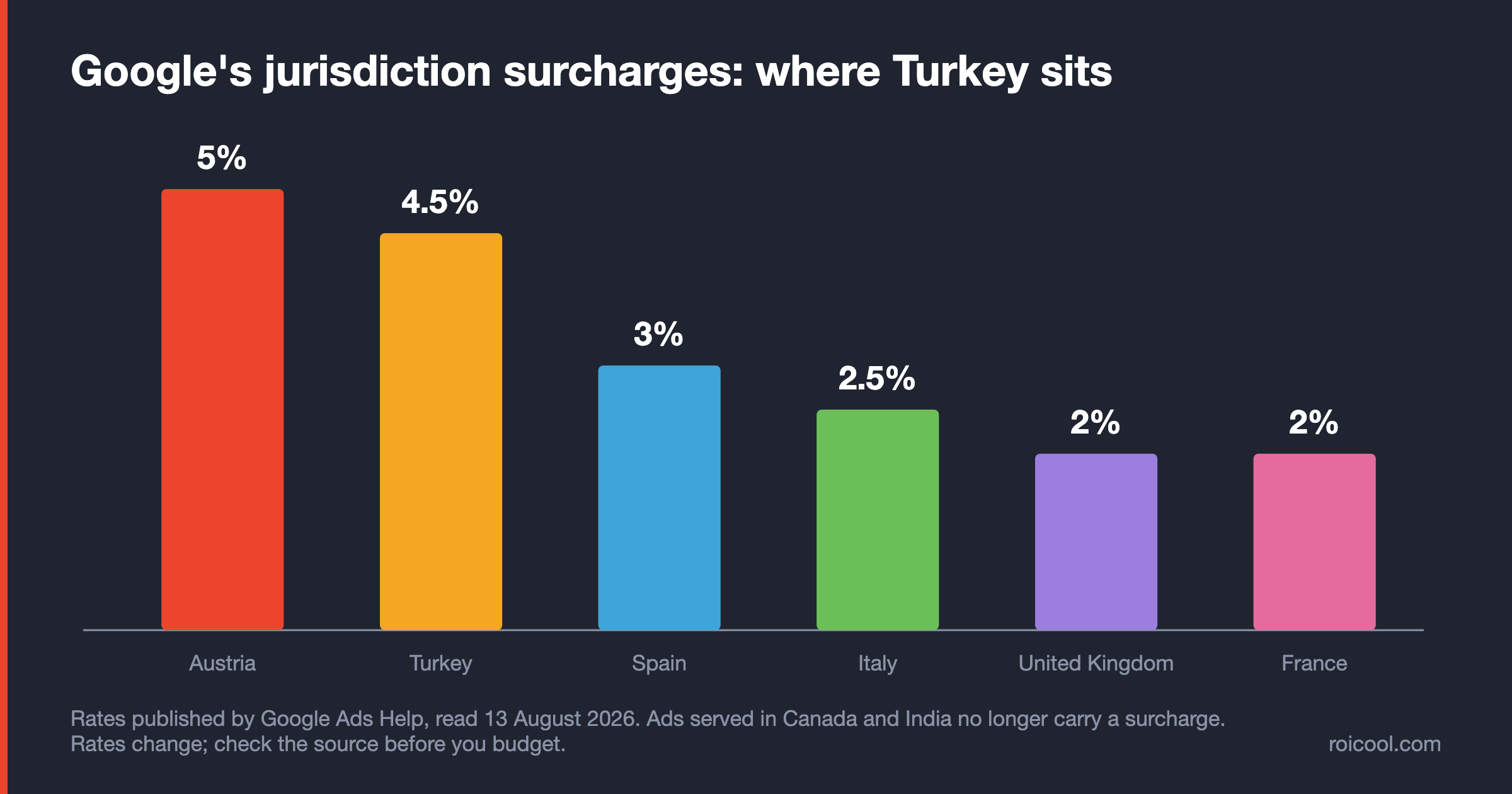
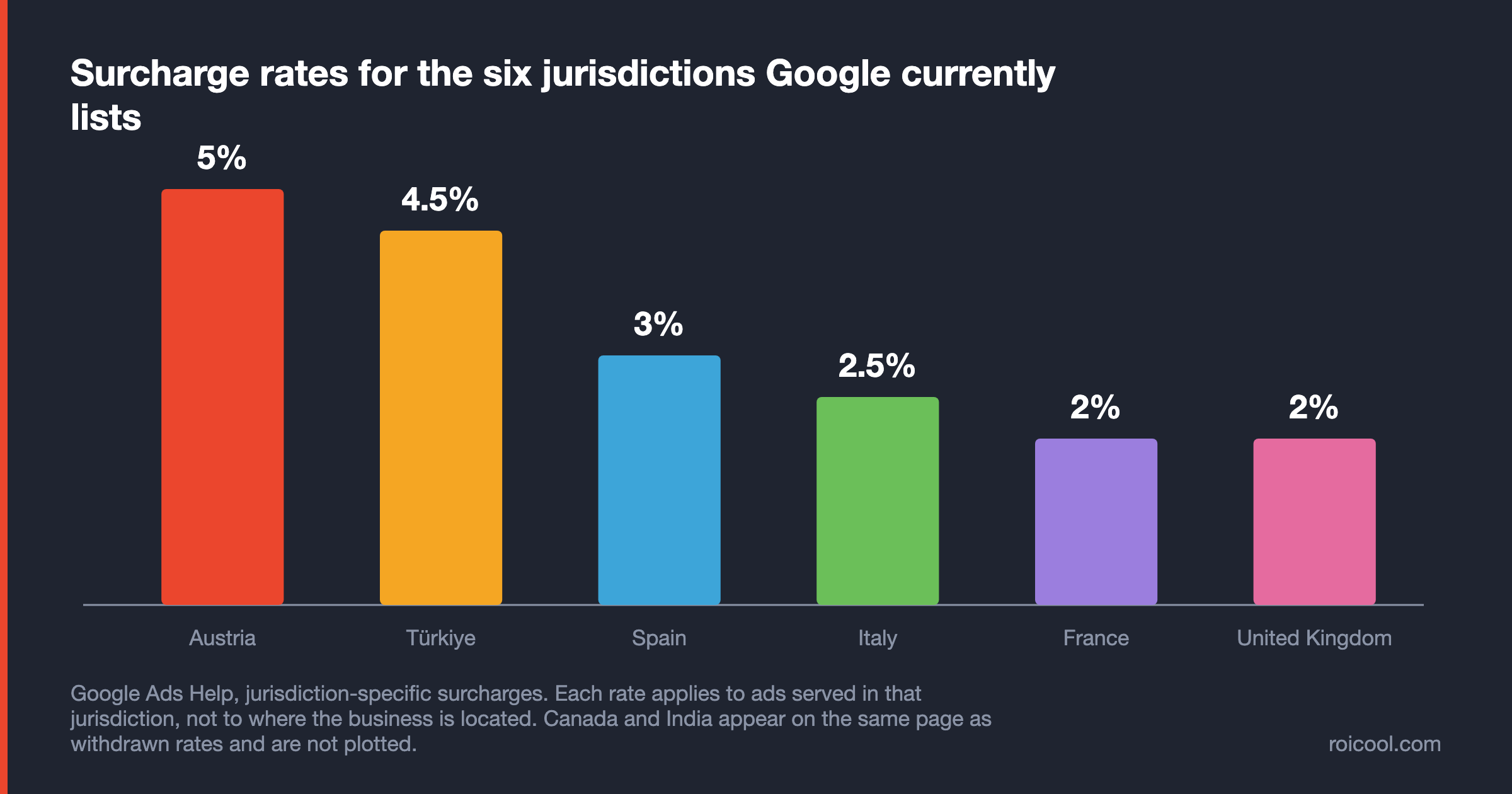
Google publishes each rate with its jurisdiction and its start date. For ads served in Austria, a 5% Austria DST Fee applies, in force since 1 November 20206. For ads served in Türkiye, the Regulatory Operating Cost was reduced from 7% to 4.5% as of 1 January 20266. For ads served in Spain, a 3% Spain Regulatory Operating Cost applies, in force since 1 July 20246.
For ads served in Italy, a 2.5% Italy Regulatory Operating Cost applies, in force since 1 July 20246. For ads served in France, a 2% France Regulatory Operating Cost applies, in force since 1 May 20216. For ads served in the United Kingdom, a 2% UK DST Fee applies, in force since 1 November 20206. These six are the jurisdictions with an active surcharge whose wording we could quote verbatim; treat the list as incomplete.
Two lines moved the other way. As of 1 July 2025, ads served in Canada are no longer subject to the 2.5% DST fee, following Canada's official legislative repeal of the Digital Services Tax6. India carried a 2% Regulatory Operating Cost from 1 October 2021, charged when the billing country was not India6; Google removed it as of 1 September 20246. A guide still listing either country is quoting a withdrawn fee.
Google also gives its reason for the Turkish line, in its own words: the regulatory operating costs are being added due to significant increases in the complexity and cost of complying with regulations there6. A rate that has a stated cause is a rate that can move again, in either direction.
Taxes stack on top of the surcharge
The surcharge is not the end of the invoice. Any taxes, such as sales tax, VAT, GST, or QST that apply in your jurisdiction will be charged in addition to the new surcharges6. The order is therefore media cost, then the jurisdiction surcharge calculated on that cost, then tax on the total. A budget built on media cost alone is short by two layers.
There is a YouTube-specific line in the same document. For YouTube placements purchased on a reservation basis, Google adds surcharges to your placement costs one time at the end of every month6. Auction spend on automatic payments or monthly invoicing sits on the same clock: the surcharges are added to your Google Ads costs one time at the end of every month, to be paid the next time you're charged6.
Manual payments and prepayments are the documented exception. There the surcharges may be charged after your payment has been fully spent, leaving an open balance that is deducted from your next prepayment6.
What is not refunded
The last rule is the one to plan around. Google will not refund the regulatory operating costs or DST fees that were levied as a result of legitimate clicks and impressions served according to your campaign target settings6. If your targeting genuinely included a jurisdiction, the surcharge on that delivery is final — which makes geographic targeting a billing decision as much as a marketing one.
If Your Account Is Billed by Google Turkey: VAT and the DST Distinction
If your Google Ads account is served by Google Turkey, a second layer applies on top of the surcharge. All Google Ads accounts served by Google Turkey are subject to Value Added Tax at the Turkish standard rate, a rate that can change at the government's discretion7, and you'll always be subject to VAT charges at the current Turkish rate, as required by Turkish legislation7.
YouTube is explicitly in scope. Google Turkey is named as your counterparty to the contracts governing the provisioning of the affected products7, and that product list names YouTube Ads and YouTube Reservation directly7.
Three separate items get confused constantly, so here they are apart. The statutory digital services tax rate in Turkish legislation is 5% from 1 January 2026 and 2.5% from 1 January 2027, set by Presidential Decision no. 1076716. Google's invoice line is a different item with a different number: the Turkey Regulatory Operating Cost, 4.5% for ads served there since 1 January 20266. VAT is the third layer, charged on top6.
The distinction is not pedantic. Google does not describe its surcharge as a tax and does not present it as a statutory rate passed through, so any guide that merges the two — quoting the legislated rate as the amount taken off your invoice — is wrong on both the number and the mechanism. We make this comparison only for Türkiye, where both sides are documented; we have not verified the same parallel for any other country.
One more note, with its limit attached. Google's Turkey section states that partial VAT withholding may apply and refers the reader to further detail, without publishing a rate7. We are not going to supply one.
How to Advertise on YouTube: The Setup, Step by Step
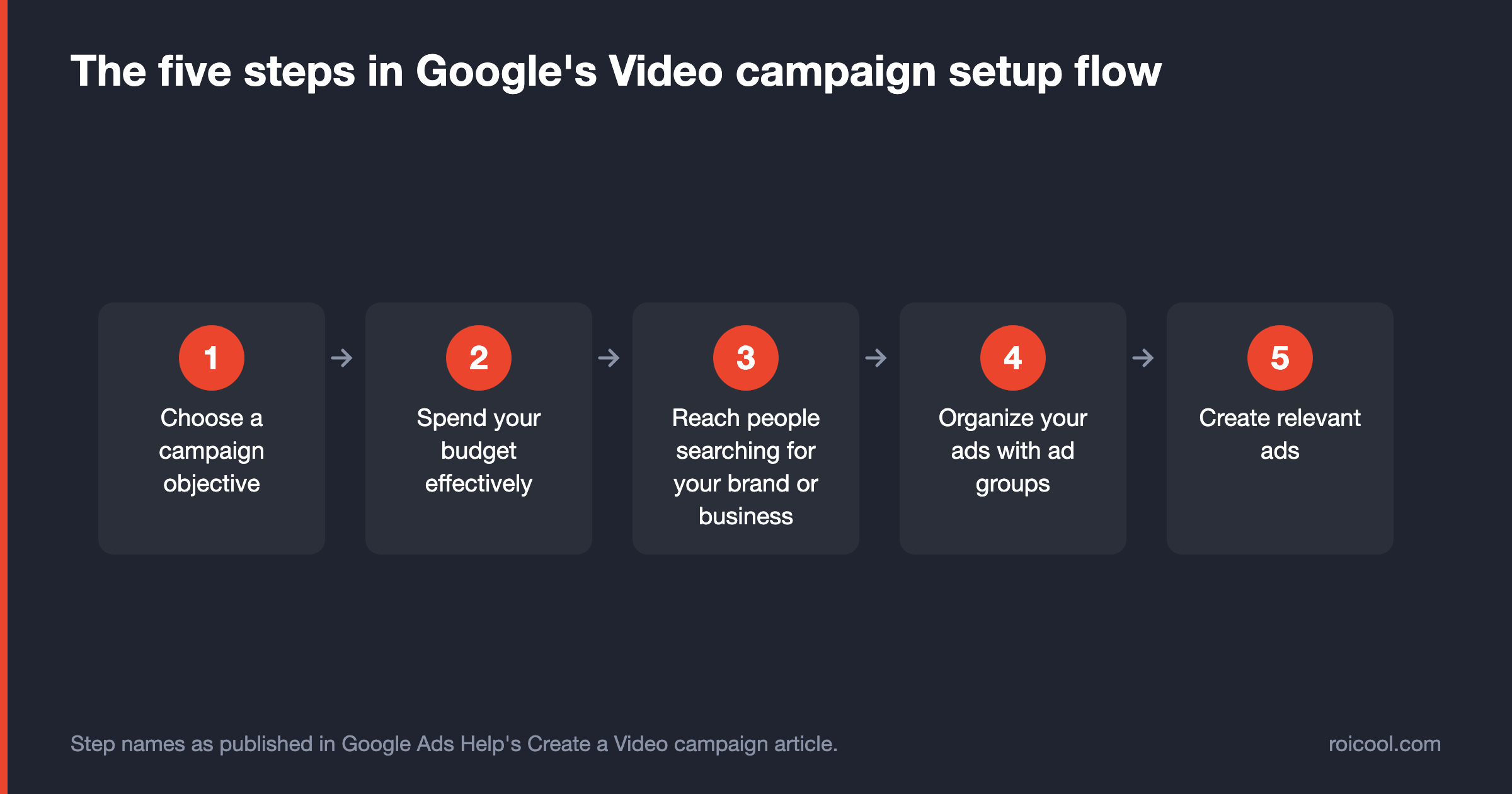
Advertising on YouTube means creating a Video campaign in Google Ads, and Google publishes that flow as five numbered steps8. A successful Video campaign should include the right targeting, bidding, budget, and ads to reach your goal8; the flow is ordered so that each of those four is decided once, in sequence.
Before you start: what has to exist
Two things have to exist before step one. The ad video must be hosted on YouTube1, which in practice means uploading it to a channel — it can be unlisted, and nothing in the format documentation asks for a subscriber base. You also need an account: if you do not have a Google Ads account yet, open it first using the guide linked above, because account setup is a different job and we are not repeating it here.
The five steps in Google's flow
- Choose a campaign objective. The objective and subtype picked here decide which ad formats the rest of the flow will offer you83.
- Spend your budget effectively. Budget and bid strategy come before targeting, which is why the spending ceiling matters at this point810.
- Reach people searching for your brand or business. Targeting is chosen after the money, not before it8.
- Organize your ads with ad groups. Ad groups are the container that lets one campaign hold several format variants8.
- Create relevant ads. Creative is attached last, against the formats the subtype allowed at step one8.
Choosing a format your subtype allows
The real decision is step one, because the subtype fixes where the campaign runs and which ad formats it can use3. A Video view campaign, for instance, pursues TrueView views using in-feed video ads, skippable in-stream video ads and Shorts ads together4, and Shorts ads are only available for multi-format ad campaigns4.
Match the format to the billing event you are willing to pay for, using the six formats listed earlier1: view-triggered formats if you are buying attention, Target CPM formats if you are buying completion and coverage1, and reservation if you need a guaranteed placement at a known price8.
One decision that looks technical is really a budget decision: reservation. If the plan needs guaranteed delivery on a date, you commit to a fixed CPM for a set number of impressions rather than bidding for them8, and Masthead is only reachable that way, through a Google sales representative1. Decide that before step two, because it changes who builds the campaign.
How many ads you can build
You can create multiple ads, up to 50, when building your campaign8. That headroom exists for a reason: multi-format campaigns need more than one creative shape, and testing needs more than one variant per shape. It is also a discipline test, because fifty near-identical cuts do not produce fifty learnings — each extra variant divides the delivery that would have made the first one readable.
What this section deliberately leaves out: account creation, platform-wide Google Ads pricing, and the choice between Search, Performance Max and Demand Gen campaigns. Those decisions sit one level above the Video campaign and belong to the guide linked above.
Is YouTube Worth the Spend? Reach and Revenue, With the Limits Stated
The decision is not made by a reach number. It is made by knowing what the reach number measures, so every figure below is quoted with the limit its own publisher attached to it.
Global ad reach and what it does not measure
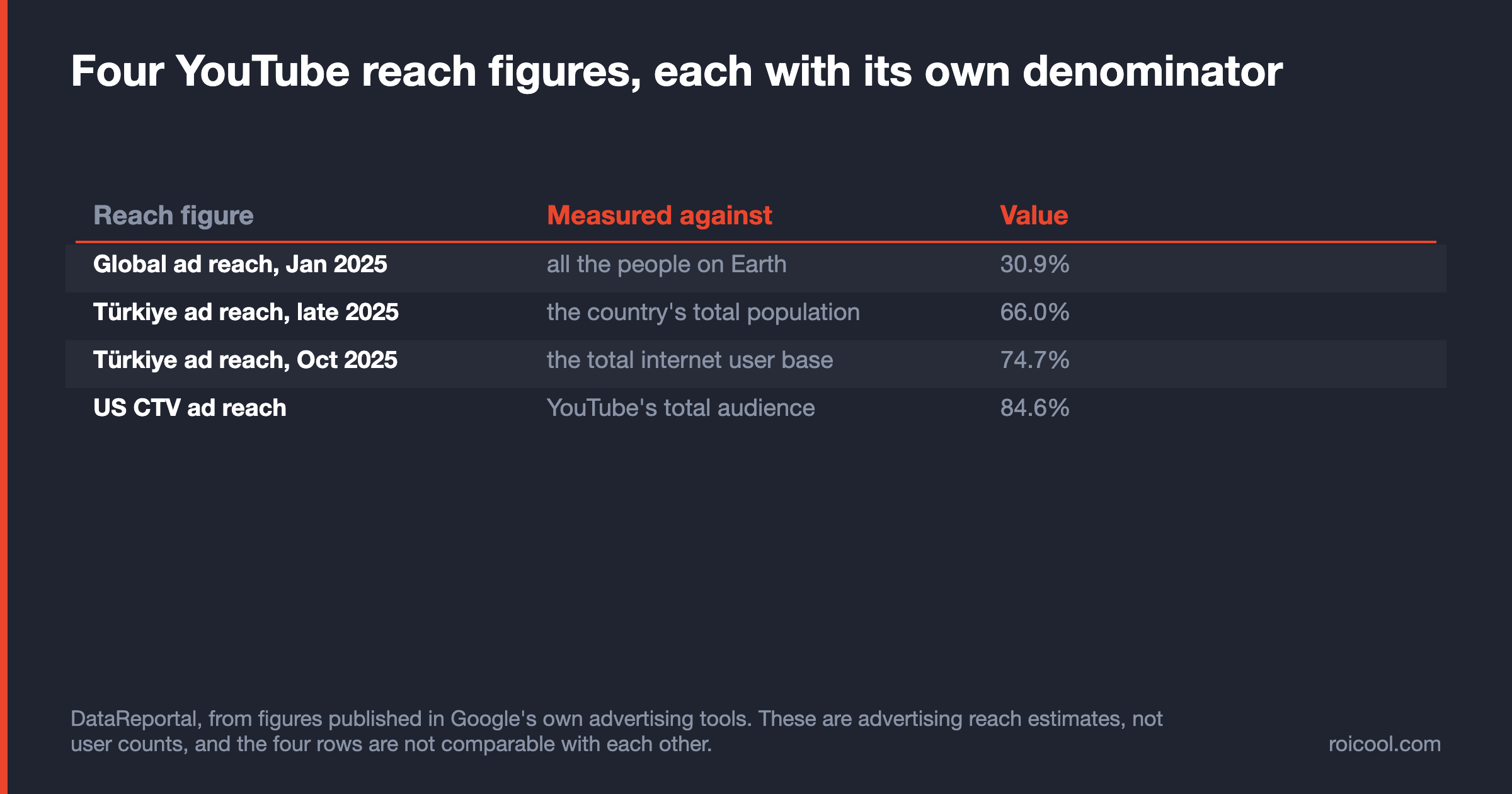
DataReportal, compiling figures published in Google's own tools, reports that YouTube ads reached 2.53 billion users in January 202511 — equivalent to 30.9 percent of all the people on Earth at that point11. The same source attaches the caveat most guides drop: advertising reach figures are not a direct proxy for a platform's overall user base11. It is an addressable-audience estimate from an ad tool, not a user count.
For planning, the trend matters more than the level. The total number of users that marketers could reach with YouTube ads increased by 39.7 million, or 1.6 percent, between January 2024 and January 202511 — single-digit growth on a base already close to saturation in most connected markets.
Connected TV is now a large share of that reach
The composition of that audience is shifting toward the living room. YouTube's own ad reach data indicates that its CTV ad formats now reach more than 4 in 10 users each month12. In the United States, marketers could reach 84.6 percent of YouTube's total audience with CTV ads12, and CTV formats reach more than half of YouTube's total audience in 22 distinct countries12.
That is why Google TV appearing in the placement list3 is a cost story rather than a trivia item. A growing share of the inventory you buy is a television impression, bought through an auction designed for video.
Revenue as a demand signal
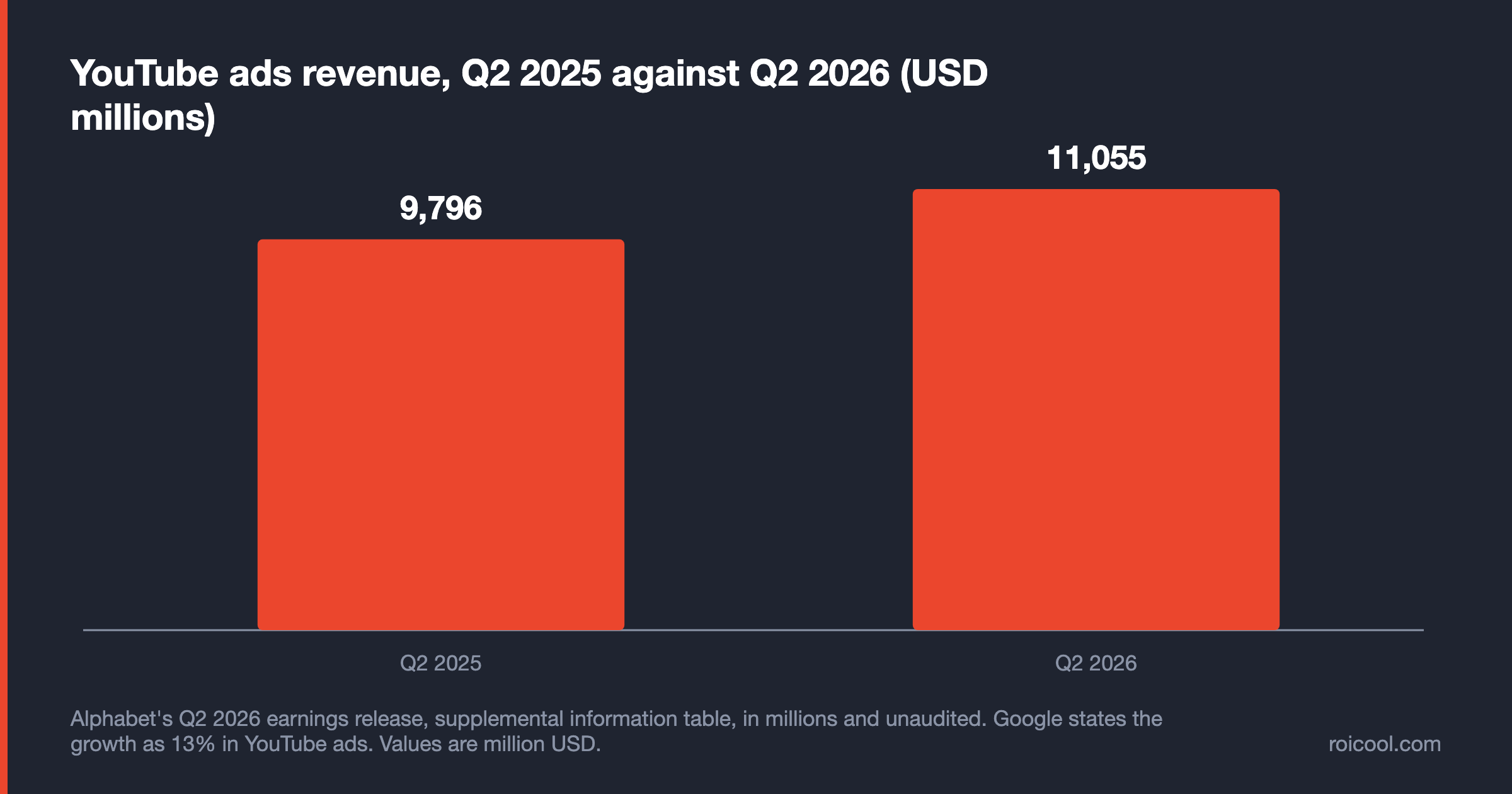
Demand for that inventory is measurable from the seller's side. Alphabet's Q2 2026 earnings release prints YouTube ads revenue of $11,055 million for the quarter against $9,796 million a year earlier18, and states the growth as 13% in YouTube ads18 — the same figure Google's CEO gave in the earnings commentary13. We quote the rate Google published and the two lines behind it, and add no third calculation of our own.
Rising revenue is not in itself a reason to advertise. It is a reason to expect competition for the same impressions to rise with it, which is the one auction effect you can anticipate without a published number.
If you are advertising into Türkiye
For the Turkish market the same discipline applies. Google's advertising resources indicate YouTube had 57.9 million users in Türkiye in late 202514, equivalent to 66.0 percent of the country's total population14, and YouTube ads reached 74.7 percent of the total internet user base in October 202514. Three numbers, three different denominators.
National statistics use a fourth. The Turkish Statistical Institute compiles the household ICT survey15, and its target population is all individuals 16-74 years old living in households15 — so a percentage from that survey and a percentage from an ad tool cannot be plotted on the same axis, whichever direction the comparison happens to flatter.
Before You Launch: The Four Levers in Order
The four cost levers above are repeated here as actions, in the order the panel forces them on you. The first cannot be edited once the campaign exists; the other three can be corrected mid-flight, at the cost of the data you already spent collecting. None of them promises a lower price, because no source we can verify publishes one.
- Decide the campaign subtype before anything else. Correcting that choice later means rebuilding the campaign, not editing a setting.
- Match the format and bid model to the result you want to count, and never compare cost per result across two different billing units.
- Treat the delivery surface as a decision rather than a default, and report YouTube, video partner inventory and Google TV separately from the first week.
- Run the formats together rather than one at a time, and treat the vendor's stated ceiling as a hypothesis you test with your own numbers.
Forecasting is not a fifth lever. It is the step before you pull any of them, and what the tool does and does not promise is set out in the budgeting section above: take the forecast, and take its stated limit with it.
The measure that decides whether any of this worked is return on investment, and it is calculated on your own data rather than on a benchmark copied from a guide. If you want the campaign built, measured and reported against that number, that is what our Google Ads agency team does — and if you are advertising into Türkiye, the surcharge and VAT layers described above belong in the plan from day one, not on the invoice as a surprise.